
Auto-Close Settings
Automatically close inactive conversations to keep your inbox organized.
Accessing Auto-Close Settings
Go to Settings in the left sidebar
Select General under the Support section
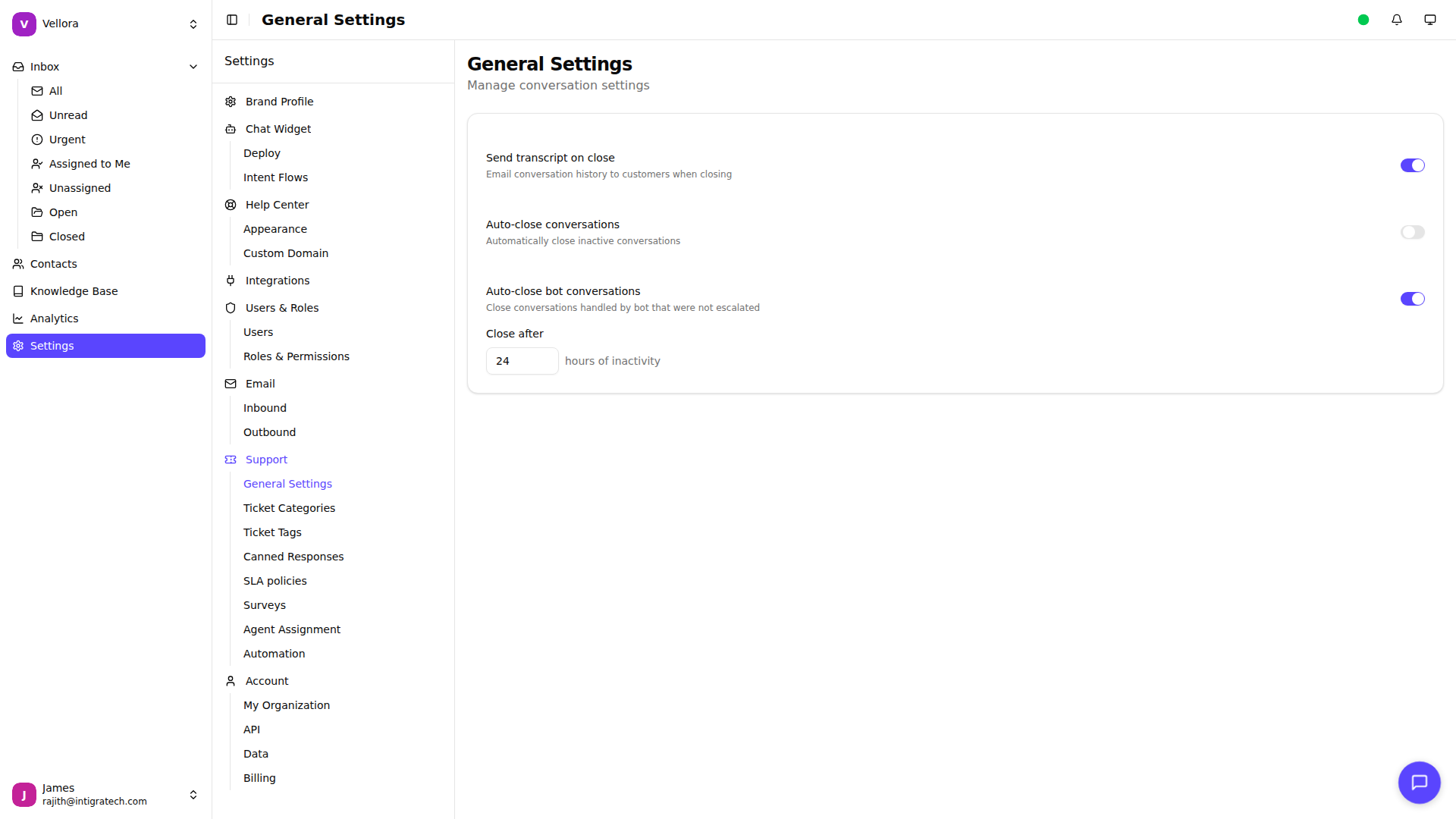
Auto-Close Conversations
Automatically close conversations that have been inactive for a specified period.
Settings:
Enable/Disable Toggle: Turn auto-close on or off
Inactivity Period: Set the number of days (1-365)
Include conversations awaiting reply: Enable if conversations must be auto-closed regardless of the reply status (default is to close only conversations that have been replied)
Default: Disabled, 7 days if enabled
How It Works:
A conversation receives no new messages for the specified number of days
The system automatically closes the conversation
The conversation moves from "Open" to "Closed" status
When a Customer Replies: If a customer sends a new message to a closed conversation, it automatically reopens.
Auto-Close Bot Conversations
Separately manage conversations that were handled entirely by the bot and never escalated to a human agent.
Settings:
Enable/Disable Toggle: Turn bot auto-close on or off
Inactivity Period: Set the number of hours (1-168)
Default: Enabled, 24 hours
Why Hours Instead of Days? Bot conversations often resolve quickly. Using hours instead of days prevents stale bot conversations from cluttering your metrics.
Criteria for Bot Conversations:
The conversation was never assigned to a human agent
No human agent sent a message
All responses were from the bot or automated flows
When to Use Each Setting
Regular Auto-Close (Days) Use for human-handled conversations. A longer period (7-14 days) gives customers time to follow up if needed.
Bot Auto-Close (Hours) Use for automated conversations. A shorter period (24-48 hours) keeps your inbox current since these conversations are typically quick interactions.
Best Practices
Don't Set Too Short Give customers reasonable time to respond. Very short auto-close periods may frustrate customers who get busy.
Consider Your Support Model
Email support: Longer periods (7-14 days)
Live chat: Shorter periods (3-7 days)
Bot conversations: 24-48 hours
Monitor Reopened Conversations If many conversations are being reopened, your auto-close period may be too short.
Communicate Expectations Let customers know when to expect responses so they reply before conversations close.
Impact on Metrics
Auto-closed conversations are counted as closed in your analytics. Keep this in mind when reviewing:
Resolution rates
Average resolution time
Closed conversation counts
Consider whether auto-closed conversations should be excluded from certain metrics when reviewing performance.