
Setting Up SMS
Connect SMS messaging to handle customer conversations via text message.
Prerequisites
Before setting up SMS, you'll need:
- A Twilio account
- A phone number capable of sending/receiving SMS
- Your Twilio Account SID and Auth Token
Configuring Twilio for SMS
- Go to Settings in the left sidebar
- Select Integrations
- Find the Twilio integration card
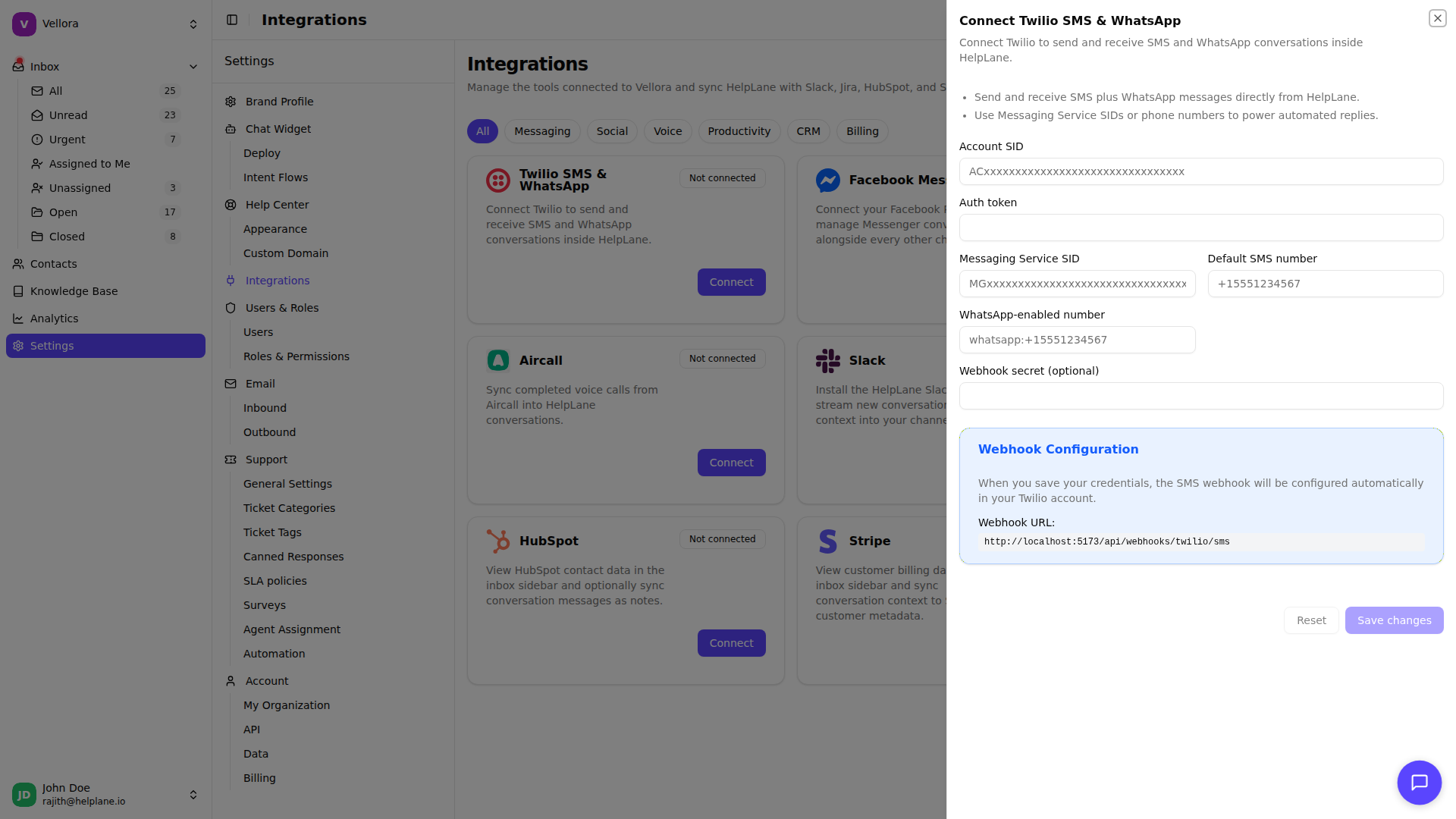
Required Settings
Enter the following credentials from your Twilio account:
Account SID Your Twilio Account SID (starts with "AC"). Find this in your Twilio Console dashboard.
Auth Token Your Twilio Auth Token for API authentication.
Messaging Service SID (Recommended) If you're using a Twilio Messaging Service, enter its SID (starts with "MG"). Messaging Services provide additional features like sender selection and compliance handling.
Default SMS Number
Your Twilio phone number in E.164 format (e.g., +15551234567). This is the number customers will see when receiving messages.
Webhook Secret (Optional) A secret key to validate incoming webhook requests.
Webhook Configuration
Helplane needs to receive incoming SMS messages via webhook. When you save your Twilio credentials, the webhook is configured automatically in your Twilio account.
Automatic Setup When you save your Account SID, Auth Token, and Default SMS Number, Helplane will automatically configure the webhook URL on your Twilio phone number. You'll see a success message confirming the webhook was set up.
Manual Configuration (if needed) If automatic configuration fails, you can set up the webhook manually:
- Copy the webhook URL shown in the integration settings
- In Twilio Console, go to Phone Numbers > Manage > Active Numbers
- Select your number and set the webhook URL for incoming messages
Testing SMS
- Send an SMS to your Twilio number
- Check your Helplane inbox for the new conversation
- Reply to test outbound messaging
Best Practices
Use a Messaging Service Messaging Services handle carrier compliance automatically and can manage multiple phone numbers.
Set up a local number Use a phone number in your customers' region for better deliverability and trust.
Monitor usage SMS has per-message costs. Monitor your Twilio usage dashboard regularly.
Troubleshooting
Messages not received
- Check webhook configuration in Twilio Console
- Verify the phone number is SMS-capable
- Ensure Twilio account has sufficient balance
Outbound messages failing
- Verify Auth Token is correct
- Check if your number can send to the destination country
- Review Twilio error logs for specific error codes